
Measured on 16 November 2026: Sensei reads a client's bill of quantities in the layout it arrives in
SenseiERP by DEXCODE

One ERP for everything you sell, deliver, bill and close

Sensei runs sales, stock, projects, production, transport and finance in one system. AI reads the paperwork; your people approve the numbers.
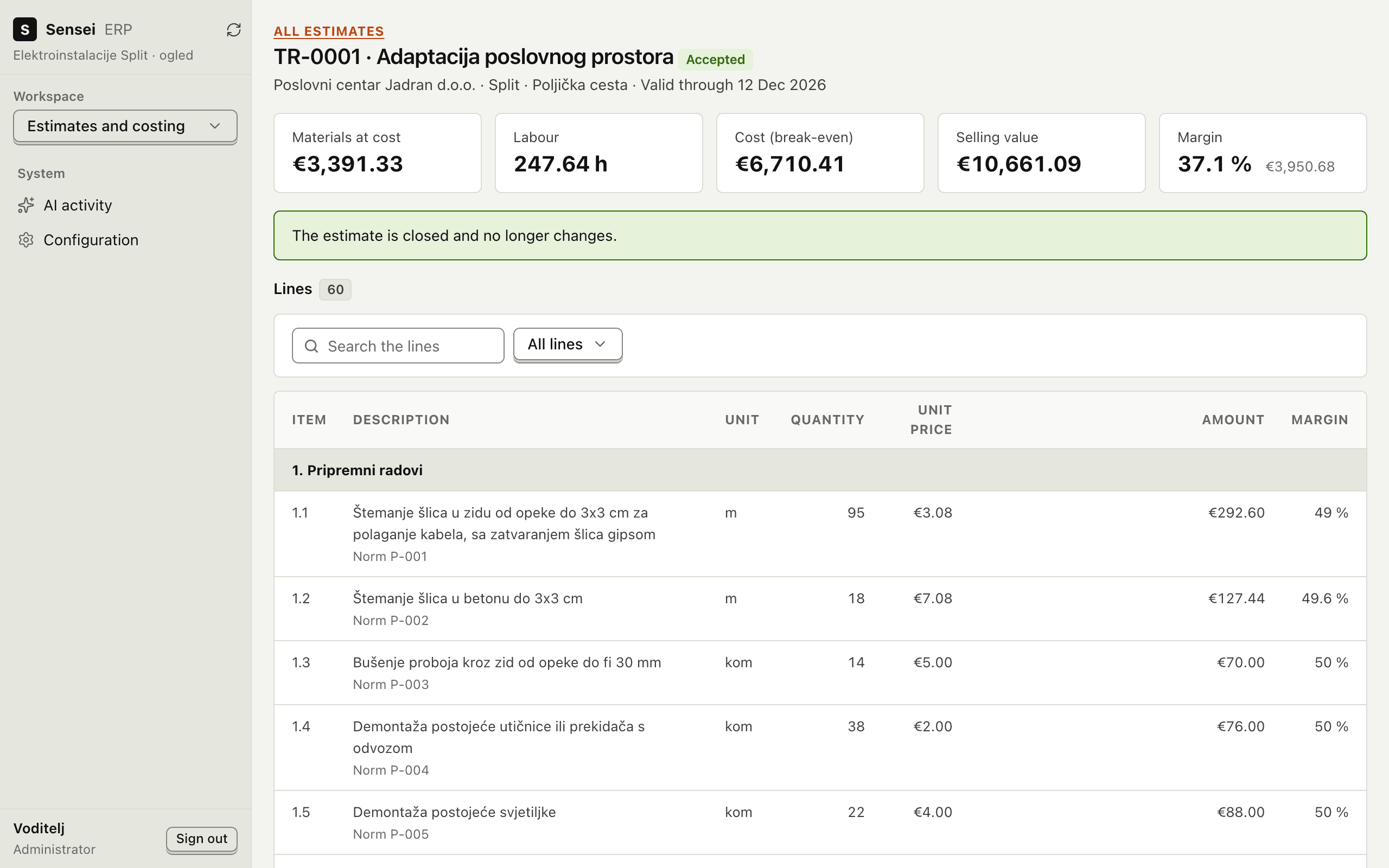
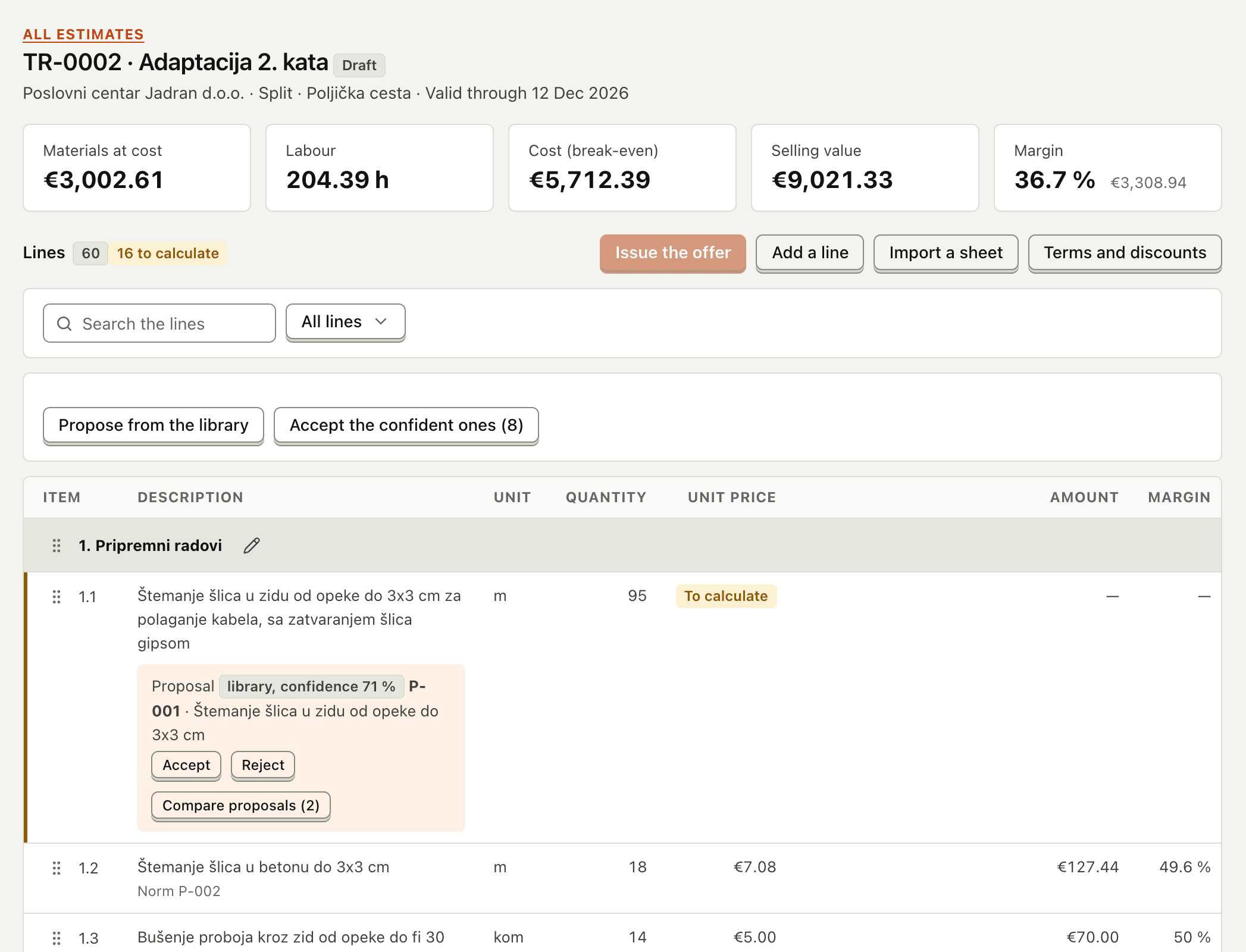
An accepted estimate: materials at cost, labour hours, break-even cost, selling value and margin, with priced lines below
Product screen · sample data

Built for companies that trade, build, make, move and store

Wholesale & distribution
Contractors
Manufacturing
Transport
Contract warehousing
Service companies
Tender bidders
Engineering firms

Every handoff recorded. Every number traceable.

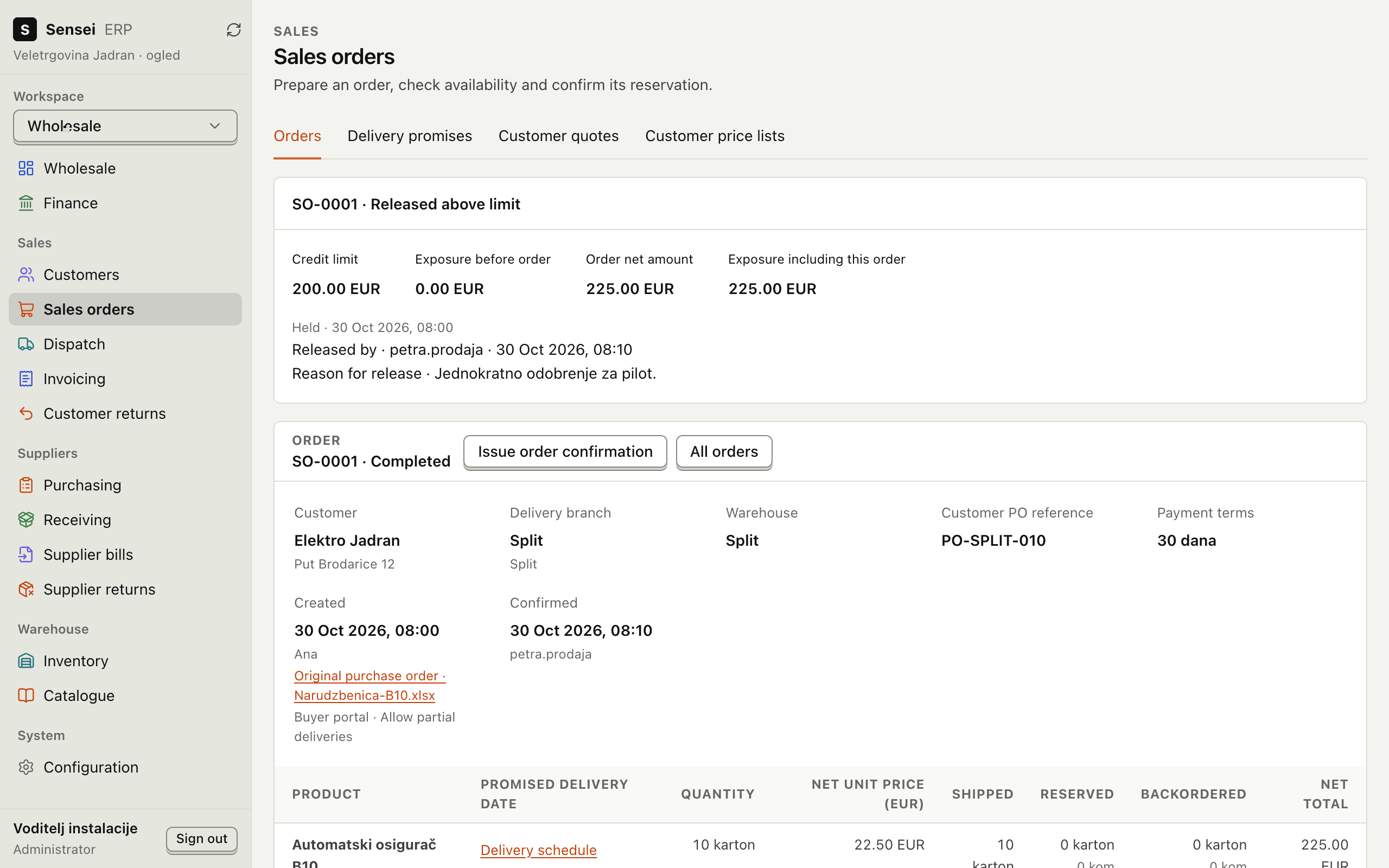
A sales order released above its credit limit with a recorded reason, with its lines and delivery schedule

Operations that hand over cleanly

An order reserves stock. Dispatch issues the delivery note. The note becomes one invoice, and the payment closes the balance. Each step keeps who did it and when.

Explore the modules
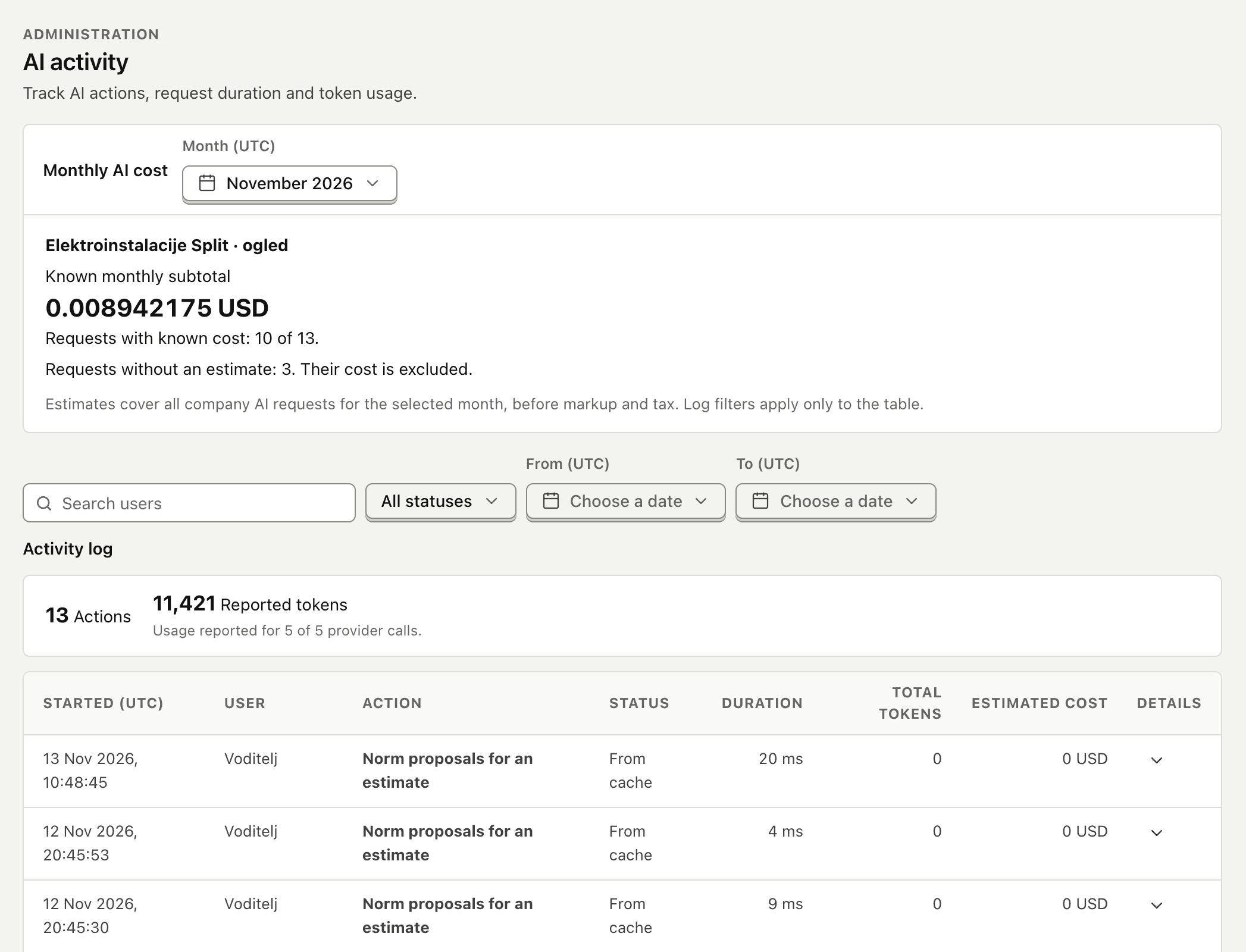
The AI activity journal: monthly cost, actions, status, duration and tokens per request

AI that works under supervision

AI reads price lists, invoices, orders and bills of quantities. A person approves before anything is posted, and every request is journaled against a monthly allowance.

See how the AI works

One system from the first offer to the month-end close

Sell
Sales CRMProspects, pipeline and follow-ups
  • Quotes at each customer's price list
  • Service offers with signed acceptance
  • Public-tender bids, lot by lot
  • Estimates from a client's bill of quantities
  • B2B portal, webshop and EDI orders
Deliver
Orders and dispatchReservations, picking, delivery notes
Projects and sitesBudgets, crews, reports, job costing
ManufacturingBills of materials, work orders, actual cost
Transport and warehousingJobs with signed proof; clients' pallets in custody
Bill
Invoices and collectionsOne invoice per delivery, milestone or stage
  • Croatian eRačun exchange
  • Supplier invoices matched to order and receipt
  • Payment runs approved by a second person
  • Bank transfers matched to invoices
  • Promises, disputes and reviewed reminders
Close
Accounting handoffA reconciled month for your accountant
  • VAT reconciled to source documents
  • 13-week cash plan with scenarios
  • Stock valued at moving average cost
  • Connection to your accounting system
3 languagesHrvatskiEnglishDeutsch
One installation per company:Own databasePinned releaseVerified backups

Sensei ERP
One platform, shaped to your kind of business

Book a demo

The same release serves a distributor, a contractor, a manufacturer, a carrier and a warehouse operator. Each company switches on the modules it needs, and the rest stay out of the way.

Wholesale & distribution

From buyer order to settled account

Confirming an order reserves stock. Dispatch ships what is packed, keeps the balance open and issues the delivery note. Each note becomes one invoice, and returns and credits link back to it.

More about wholesale

Ten cartons ordered against a €200 credit limit. Nine ship on Friday, one on Tuesday. Two come back damaged: 24 pieces to quarantine, a €45 credit, statement at zero.

An acceptance scenario, run on sample data
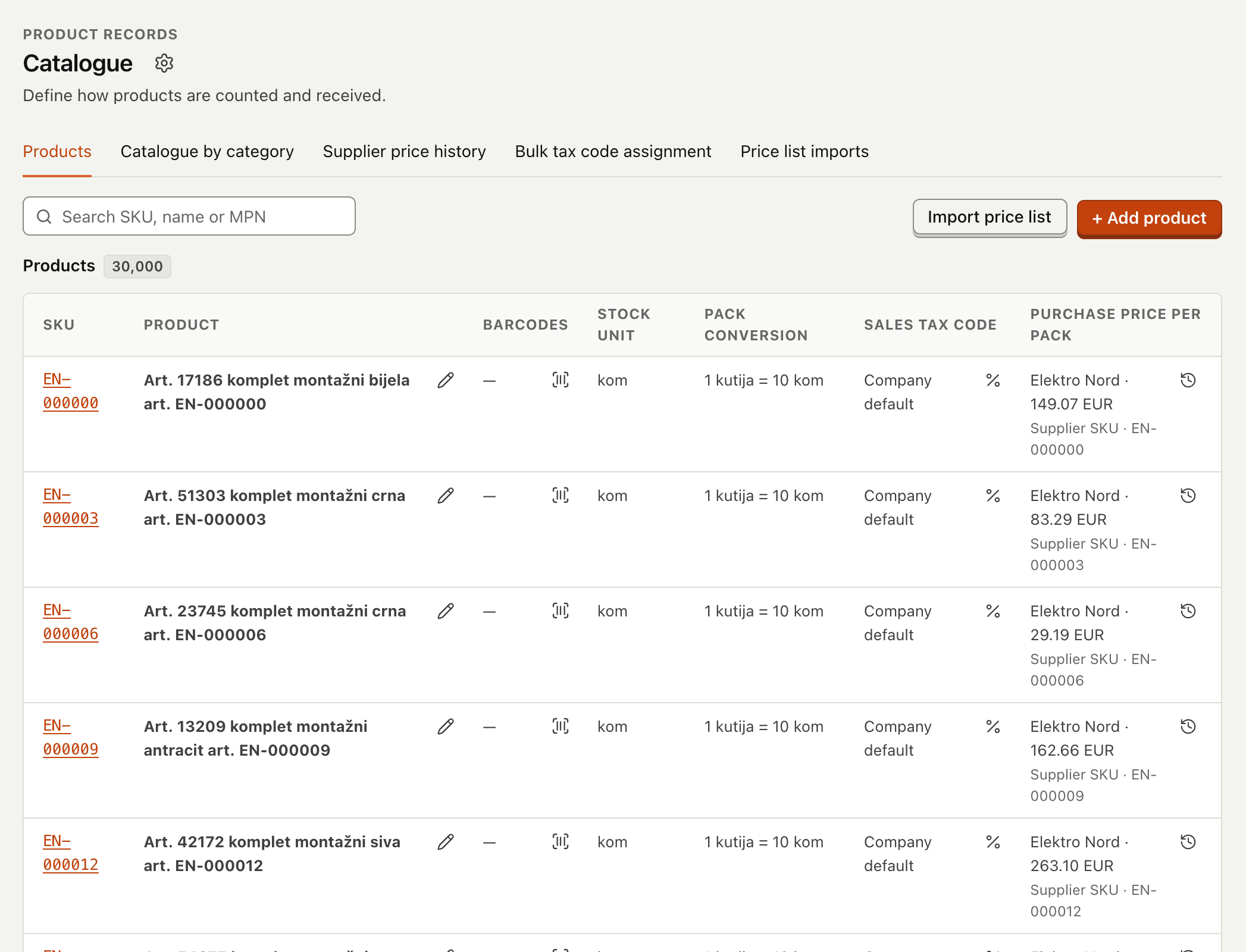
The product catalogue with 30,000 products, pack conversions and purchase prices per supplier
Product screen · sample data
Projects & site operations

Know what a job earned, not just what it billed

Open a project with its budget, team and milestones. Site workers post reports with photos; material, approved hours and supplier bills land on the job; finance bills each milestone or the quantities executed.

More about project work
Site reports and approvals

A worker posts a progress note with a photo. The project lead reviews it and decides.

Materials for the site

A site request is supplied from stock or becomes a linked purchase order; unused material is returned.

Labour and subcontractors

Time is approved by a supervisor at an hourly rate. Supplier service bills are assigned to the job.

Costs and result

Budget, open commitments, materials, labour, services and overheads against revenue, with every figure opening its documents.
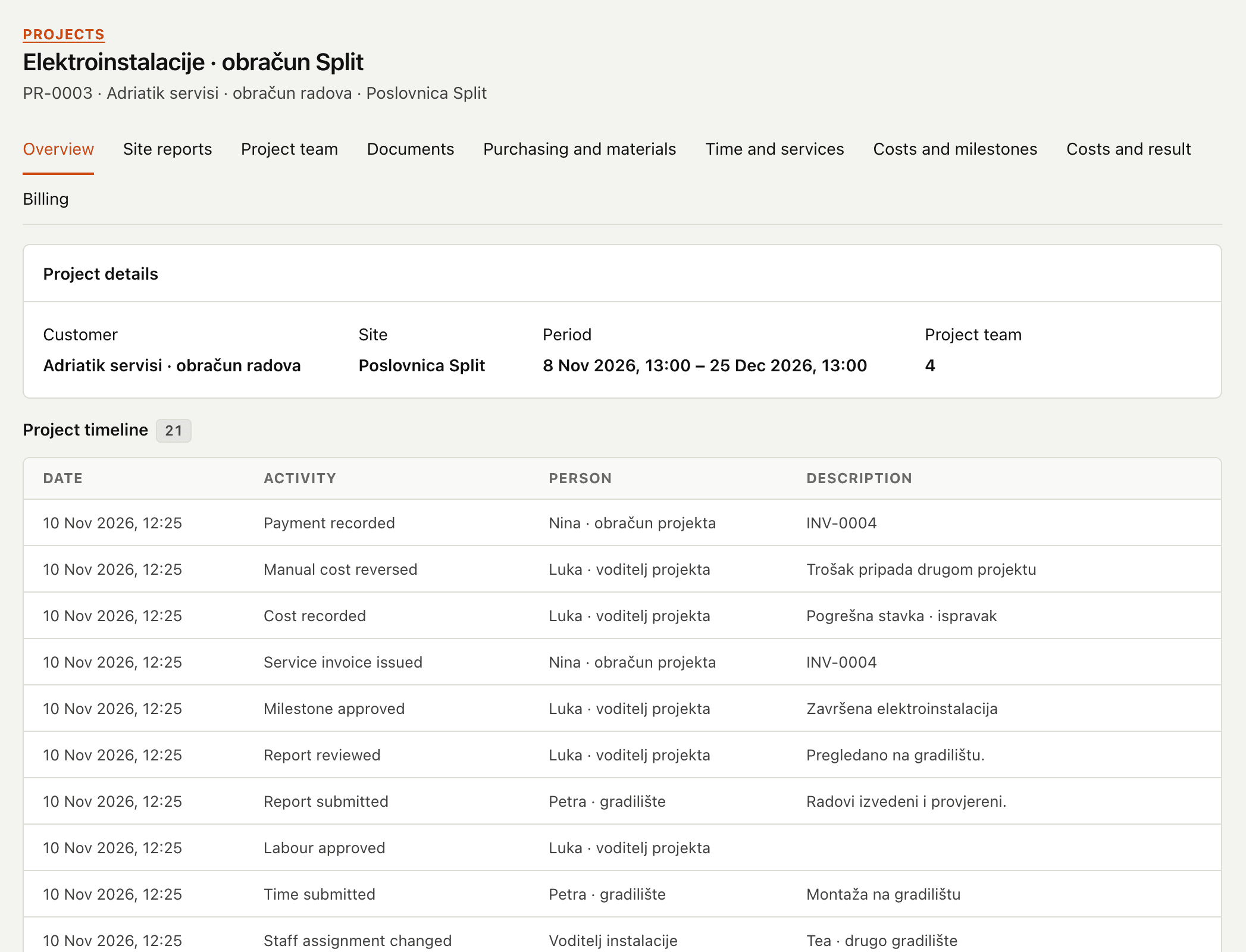
A project's overview with its timeline of reports, approvals, costs and invoices
Product screen · sample data
Manufacturing

Assembly with the real cost of every piece

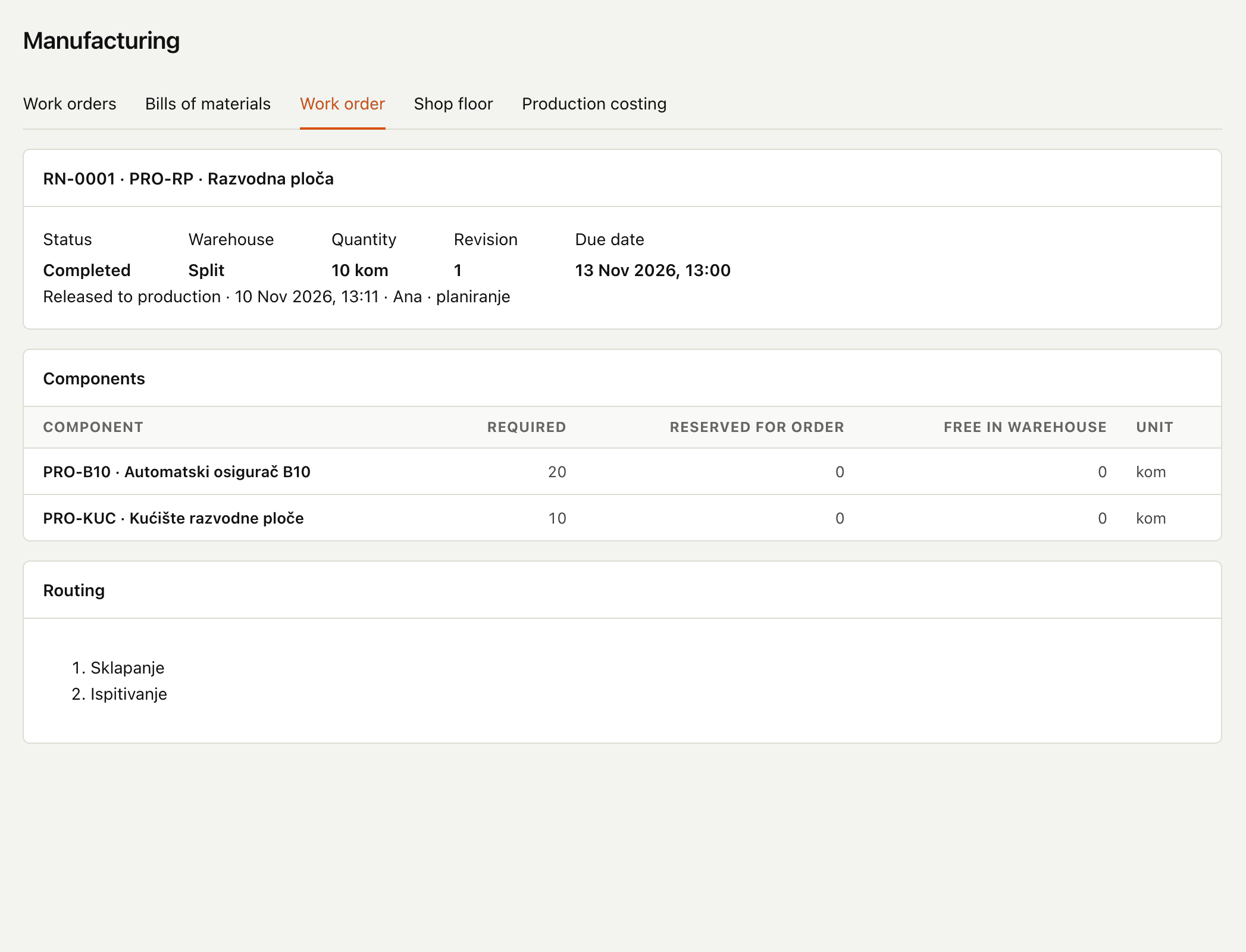
Publish a bill of materials and release a work order, and its components are reserved. The shop floor records issues, scrap and time; completion receives finished goods at actual cost.

More about manufacturing

What does a work order record?

Recipe revisionReserved componentsMaterial issuesScrapTime per stepUnit cost
A completed work order with its components, reservations and routing steps
Product screen · sample data
Transport

Every job from booking to signed proof

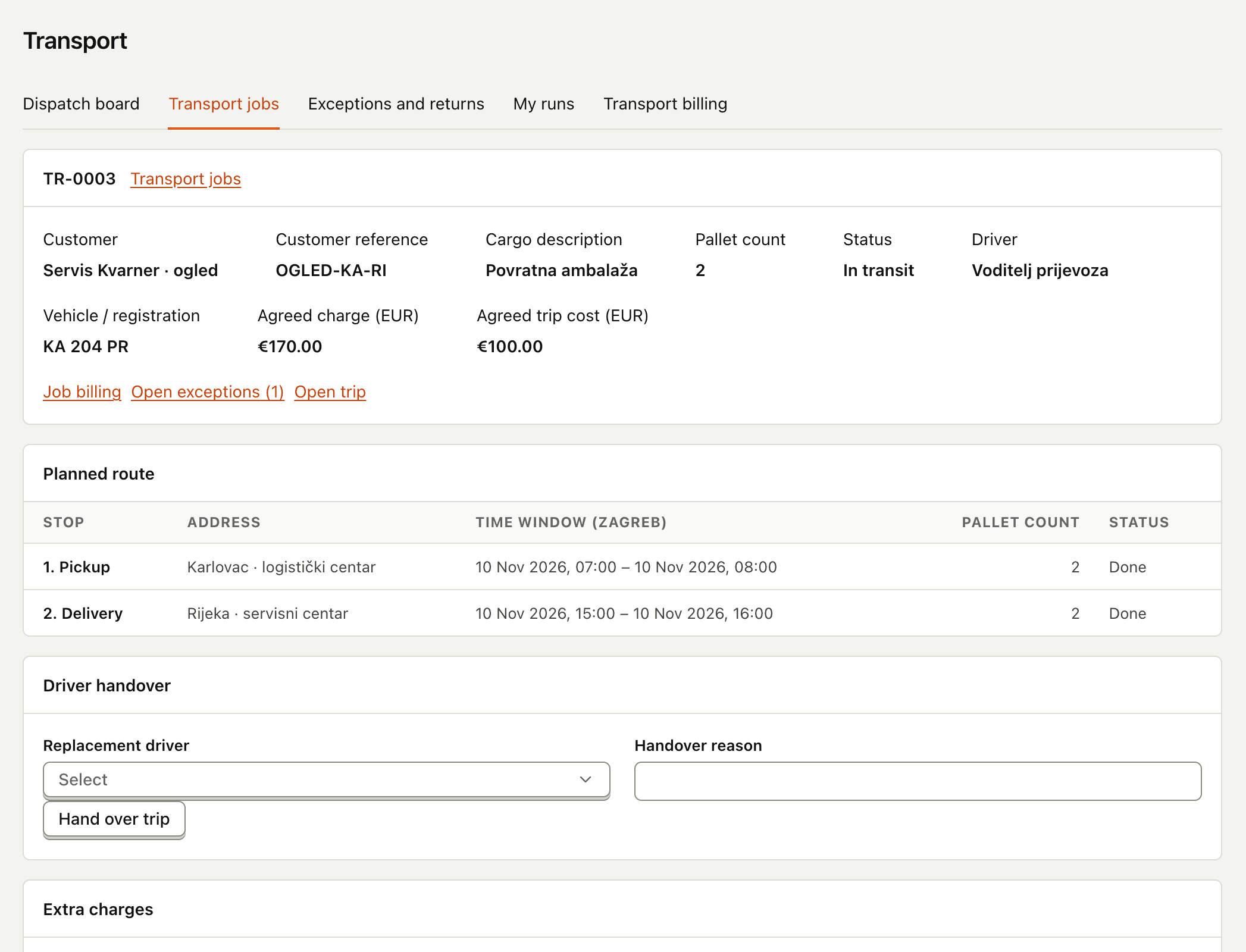
Book multi-stop jobs, assign your own vehicle or a subcontracted carrier, and let drivers record collection and delivery with a signed document. Closing the job freezes charges, carrier cost and margin.

More about transport

What does it cover?

Dispatch boardDriver runsProof of deliveryExceptions and returnsBilling closeout
A transport job with its planned route, pallet count, agreed charge and trip cost
Product screen · sample data
Contract warehousing

Other people's pallets, billed to the day

A custody ledger keeps each client's stock apart from yours. Clients ask for releases in their own portal, and the monthly statement bills receiving, storage per pallet-day and dispatch at the agreed rates.

More about warehousing
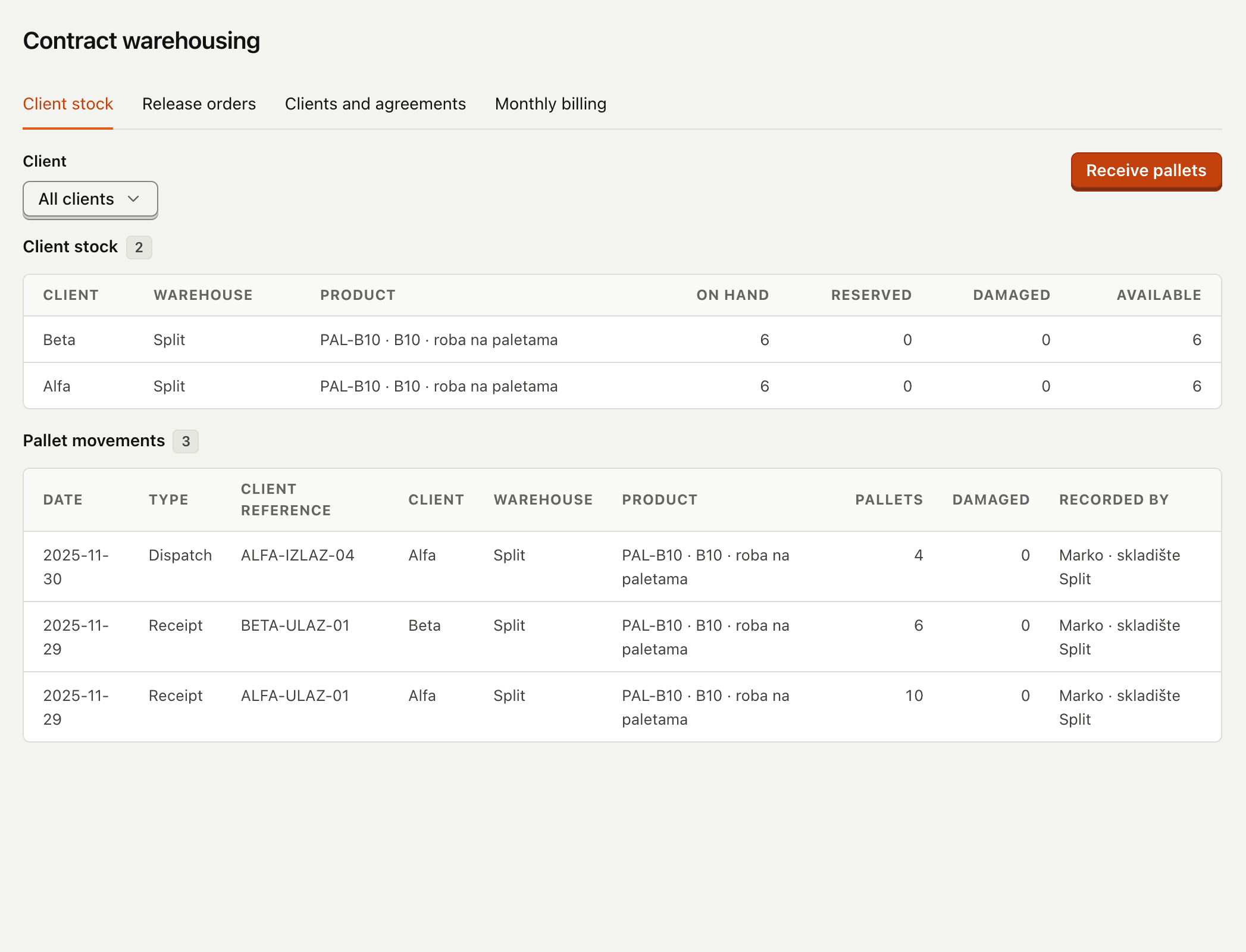
  • Client portal with balances, movements and statements
  • Partial releases; damaged pallets held back
  • Statements frozen at month-end, ready to invoice
Client stock in contract warehousing: pallets on hand per client and the pallet movements
Product screen · sample data
Estimates & calculations

A bill of quantities in, an offer with margin out

Import the client's Excel as it arrives. Lines are priced from your norms and your suppliers' price lists, each with cost, selling price and margin. A manager approves over a preview, and the client's own file comes back filled in.

How the file is read

What can it take in?

Workbooks with many sheetsPositions over several rowsSheets without headingsPrice lists in Excel, CSV, PDFA supplier's APIScanned price lists
An estimate in preparation: a line with a norm proposed from the library and its confidence, waiting to be accepted
Product screen · sample data
Finance & month-end

Cash you can see thirteen weeks ahead

Supplier invoices, approved payment runs, collections and bank matching feed one 13-week cash plan. At month-end, sales, purchases, VAT and bank reconcile into a package for your accountant.

More about finance

November closes with €875 gross sales and €159 VAT due. A later recoding of a maintenance expense goes out as a dated correction: the closed month stays as it was approved.

An acceptance scenario, run on sample data
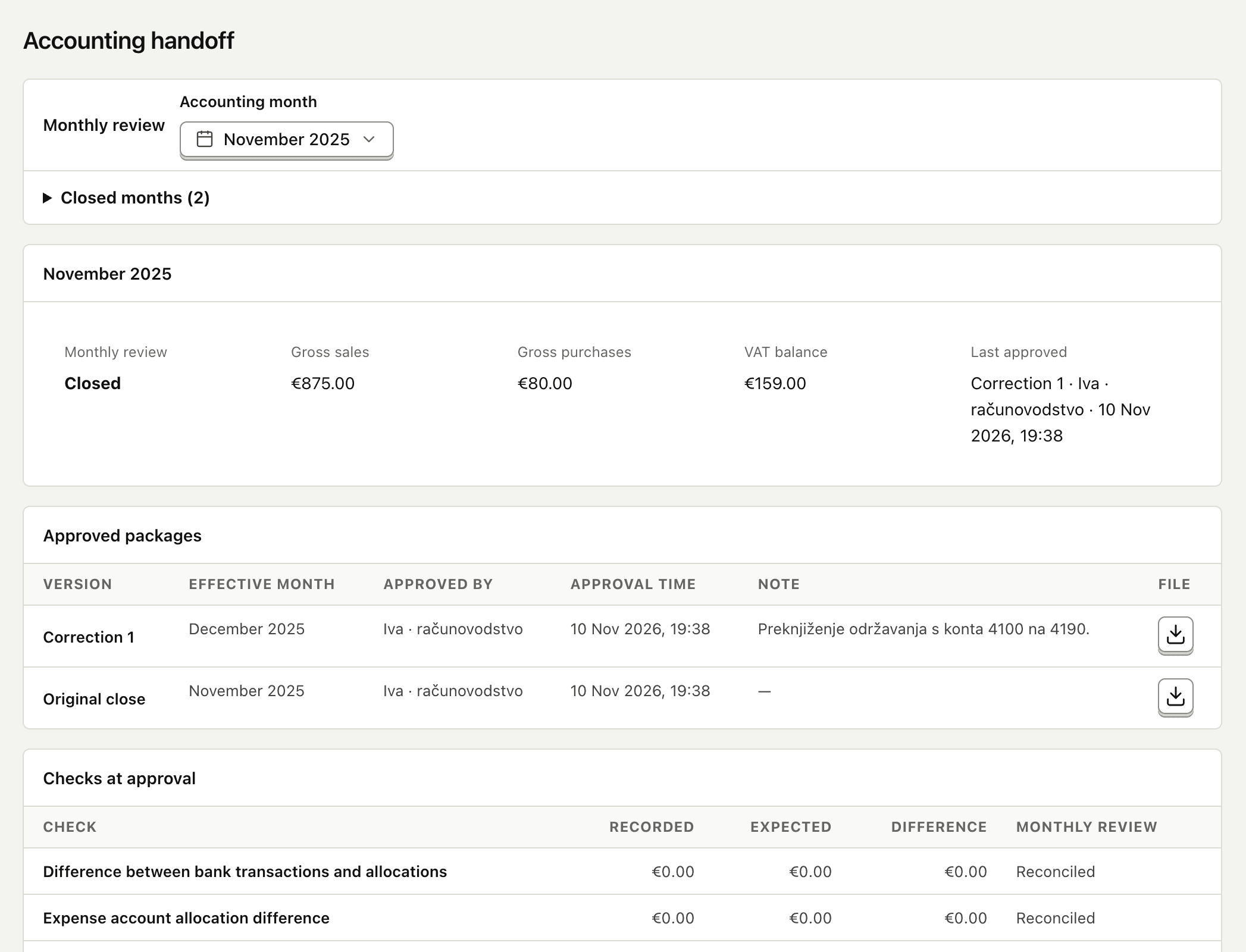
A closed accounting month with its approved packages and the checks made at approval
Product screen · sample data

// AI under supervision

AI reads the file. Your people approve the numbers.

Sensei's AI reads what a business receives as files: supplier price lists, scanned pages, invoices, orders and clients' bills of quantities. It never sets a price and never posts a document. Every request is recorded in your company's own journal with its user, outcome and usage, and stops at the monthly allowance you set.

ruleAI names rows and nothing else. Every text, unit and quantity is copied from the file's own cells.

Measured on 16 November 2026 on three real client workbooks, and on a workbook of nine layouts with a known right reading.

See how the AI works
$ reading a client's bill of quantities
16 Nov 2026 · three real client workbooks

sheets taken14
positions found1,015
confirmed by both readings944
settled by the second look70
left for a person1
requests · journaled cost45 · $0.46

$ workbook of nine unseen layouts
positions read right47 of 47
left for a person0

Measured, not promised

Read how it was measured

Numbers from the product's own acceptance runs, each with its date and its conditions. No rounded-up marketing figures.

1,015 of 1,019
positions read from three real client workbooks, 1,007 with their whole text

Every position of the three files was found, and the quantity, the unit and the row where the price goes are the same in both readings for all of them.

From the release guide, 16 November 2026
Classification
96%
of 30,000 products filed by rules in one 24-second background job
Search
0.04 s
for a filtered query with live counts across 30,000 products
Layouts never seen before
47 of 47
positions read right on a workbook of nine new layouts, checked against the known answer

Catalogue figures: 12 November 2026, generated data, a release build on a developer laptop. Reading figures: 16 November 2026. On the three client workbooks every position is read twice, by AI and by independent rules, and a second look settles the ones that differ; on the nine-layout workbook the reading is checked against the known right answer.

More reasons to choose
Sensei

Book a demo

Built for work that passes between roles: sales, purchasing, warehouse, site, production and accounting. Each of them sees their part, and every posted step keeps who did it and when.

Industry workflows
5
Interface languages
3
Cash plan horizon
13 weeks
Automated tests · 12 Nov 2026
2,881

An upgrade is rehearsed on a restored copy before it touches your data

How installations work

At cutover, a difference of one cent blocks approval of the opening balances

How moving in works

Access you can audit

Teams, warehouse scope and a preview of what a person will see before a change is saved. MFA can be required for administrators and Accounting.

TeamsWarehouse scopeAccess previewAuthenticator MFARecovery codesChange history

An installation of your own

Your own database, your own process and your own pinned release. One company is upgraded while another stays put.

Databaseyours alone
Releasepinned per company
Backupverified by restoring it
Upgraderehearsed first

Works with the files and systems you already have

Excel and CSV from suppliers and clients, PDFs and scans, bank statements, payment files, e-invoices, webshops and trading partners.

.xlsx.csv.pdfscanbank CSVSEPA pain.001UBL e-invoiceIMAP mailboxsupplier APIETIMEDIwebshop

Built by Dexcode, offered as a product

Sensei is built by Dexcode, a software development agency, as a product of its own: one codebase and one release line, installed separately for each company. We work with each company directly through onboarding. Your data is brought over and reconciled to the cent, your e-invoicing provider, your bank and your accountant are connected and tested with you, and your people are trained on their own workflows before the first live day.

Frequently asked questions

What is Sensei?
Sensei is a modular ERP. It connects the work of sales, purchasing, warehouse, projects, production, transport and finance in one system, so that an order, a job or an invoice is entered once and followed to its end. Each company switches on the modules it needs.
Which businesses is it built for?
Wholesale and distribution, contractors and project work, manufacturing, transport and contract warehousing each have their own workflow. Service offers, sales CRM, public tenders, estimates, and documents and approvals are shared modules any of them can add. It suits companies whose work passes between several roles and where a missed handoff costs money.
Can I see it on my own kind of work?
Yes. Tell us what your company does and we show the workflow closest to yours, end to end, on a sample company. Bring one order, one job or one bill of quantities and we walk it through.
What does the AI do, and what leaves my company?
AI reads files a business receives: supplier price lists, scanned pages, invoices, orders and clients' bills of quantities, and proposes norms, names and drafts. It never sets a price and never posts a document; a person approves. Each feature sends only what it needs, and the AI page says what that is. Every request is recorded in your company's journal and counts against a monthly allowance.
Where does my data live?
Each company has its own installation: its own database, its own process and its own pinned release. Backups are verified by restoring them, and an upgrade is rehearsed on a restored copy before it runs on live data.

See Sensei on your own workflow

Bring one order, one job or one bill of quantities. We will walk it through the system and show where each handoff lands.